· Knowledge Base · 12 min read
Pet Grooming Software: Scheduling & Client Management
Pet grooming software replaces scattered calendars and phone texts with one platform for scheduling, reminders, and payments.
What Does Pet Grooming Software Do for Your Business
It’s 2:47pm on a Wednesday. You’re elbow-deep in a matted Shih Tzu, your phone is buzzing with a client wanting to reschedule, and you just realized you double-booked the 3:30 slot because your paper calendar didn’t show that Sarah was already using the tub. Meanwhile, the new client who called last night went to voicemail—and booked with your competitor this morning.
Pet grooming software is a digital system that replaces scattered calendars, personal phone texts, and separate payment apps with one platform built for how grooming businesses actually run. This guide covers what grooming booking systems do, why generic tools fail groomers, and how the right software stops no-shows, captures after-hours bookings, and eliminates the daily schedule chaos that costs you money.
Here’s what a grooming-specific system typically handles:
- Online booking: Clients schedule appointments themselves without calling, even at 11pm when you’re off the clock.
- Automated reminders: Texts and emails go out automatically before appointments to cut down on no-shows.
- Client and pet database: Appointment history, grooming notes, breed info, and contact details live in one searchable place.
- Payment processing: Checkout, revenue tracking, tips, and taxes happen without switching between apps.
The business case is straightforward. A groomer losing 3 appointments per week to no-shows at $75 average ticket loses $11,700 annually. Software that cuts that rate in half pays for itself many times over.
Why Generic Scheduling Tools Fail Grooming Businesses
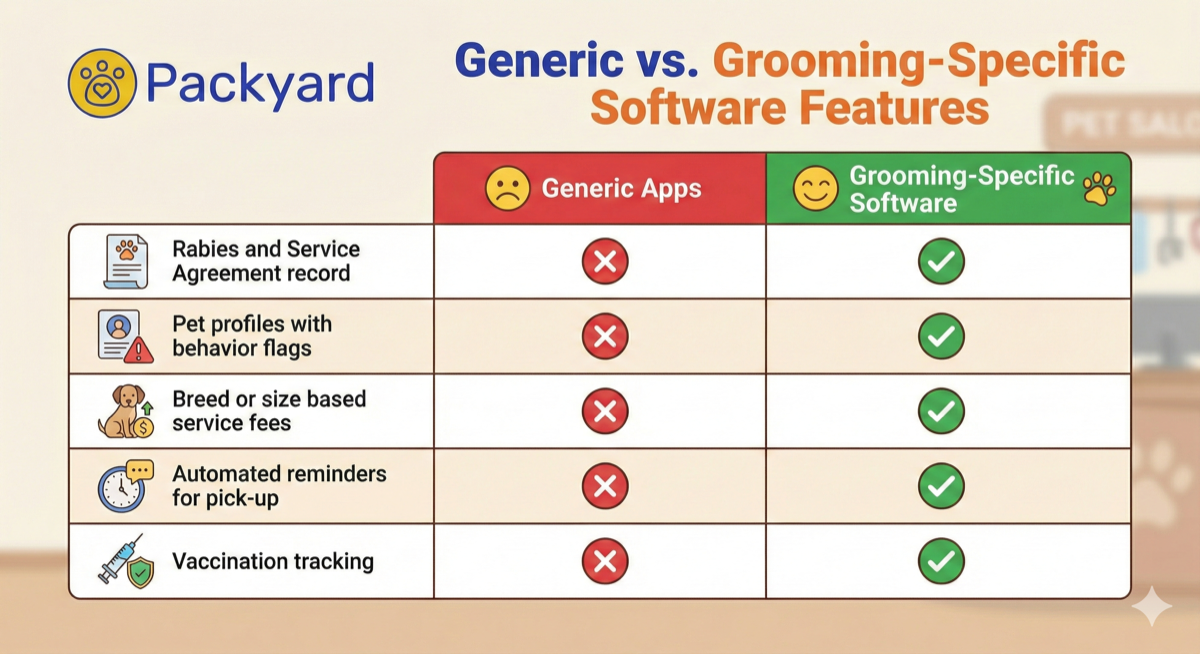
Google Calendar works fine for a consultant with hour-long meetings. It falls apart the moment you try to schedule a bath, haircut, nail trim, and teeth brushing on one Goldendoodle while managing two other groomers and three drying cages.
Generic scheduling tools weren’t built for service stacking—the ability to combine multiple services into one appointment block with accurate time calculations. They can’t show you which groomer has table 2 at 2pm while another groomer uses the tub. And they don’t store that Bella the Bichon bites during nail trims or that her owner always adds a blueberry facial at checkout.
| Capability | Generic Calendar | Grooming-Specific Software |
|---|---|---|
| Service stacking (bath + cut + add-ons) | Manual math required | Automatic time calculation |
| Pet profiles with breed and behavior | Not available | Built-in |
| Multi-groomer, multi-table view | Limited or none | Standard feature |
| Grooming-specific time blocks | Not available | Configurable per service |
The real cost shows up in double-bookings, forgotten add-ons, and the 15 minutes you spend every morning doing schedule math in your head. That’s time you could spend grooming.
How Automated Reminders and Confirmations Stop No-Shows
A single reminder text the day before catches some forgetters. But it misses the client who saw your text at 7pm, meant to call about rescheduling, then forgot again. By morning, your 9am slot is empty and unfillable.
Automated reminders work through cadence—the timing and frequency of messages sent before an appointment. Once you configure the sequence, the software handles everything automatically.
Setting a Reminder Cadence That Works
A typical sequence looks like this:
- Immediate confirmation: Sent the moment a client books, establishing the commitment.
- 48-hour reminder: Gives clients time to reschedule if a conflict came up.
- 24-hour reminder: Requests final confirmation with a reply option.
- Day-of reminder: Morning of the appointment, 2-4 hours before.
Each touchpoint reduces no-show probability. Groomers who implement multi-touch sequences often see no-shows drop by 38% with text reminders compared to single-reminder approaches.
Tracking Who Confirmed and Who Ghosted
Confirmation tracking logs which clients reply “yes” versus which ones ignore every message. Over time, this creates a reliability history for each client.
The software can automatically flag repeat no-shows on their profile. So when Mrs. Patterson books again—the one who’s ghosted you three times—you see that flag immediately. At that point, you might require a deposit before confirming her next appointment.
Calculating What No-Shows Cost You
The math is simple but painful:
Average Appointment Value x Monthly No-Shows = Monthly Lost Revenue
$80/groom x 5 no-shows = $400/month = $4,800/year
That’s conservative. Many groomers without prevention systems see 8-12 no-shows monthly. At $80 average, that’s $7,680-$11,520 in annual lost revenue—plus the clients you turned away to hold those slots.
24/7 Online Booking Without Scheduling Chaos
It’s 10:47pm on a Thursday. A new client finds your Instagram, loves your work, and wants to book. Your phone is off. By Friday morning when you check messages, she’s already booked with someone else—one of the 70% of consumers who prefer booking online rather than calling.
Online booking is a web page where clients select services, pick available times, and confirm appointments without calling. The “24/7” aspect matters because 34% of appointments are booked outside business hours—evenings, weekends, lunch breaks.
Many groomers fear online booking will create chaos: clients booking impossible combinations or stacking appointments back-to-back with no cleanup time. This is where business rules come in.
Business Rules That Protect Your Calendar
Business rules are settings that control what clients can and cannot book online. The software enforces them automatically, so you don’t have to.
Common rules include:
- Service durations by breed: A Shih Tzu full groom blocks 90 minutes; a Great Pyrenees blocks 3 hours.
- Staff-specific services: Only Sarah does cat grooming; only you handle aggressive dogs.
- Capacity limits: Maximum 2 dogs drying at once, maximum 4 appointments per groomer per day.
- Lead time requirements: No bookings within 4 hours of the current time.
- Blocked personal time: Lunch from 12-1pm, no bookings after 4pm on Fridays.
The client sees only available, valid options. They can’t create a mess because the system won’t let them.
Preventing Double-Booking and Last-Minute Reshuffles
The software checks calendar availability in real time before confirming any online booking. When a client selects 2pm Tuesday, the system verifies that slot is actually open across all relevant resources—groomer, table, tub, drying cage—before confirming.
Buffer time adds another safeguard. You can configure automatic gaps between appointments—15 minutes for cleanup, 10 minutes for client handoff—so one late pickup doesn’t cascade into afternoon chaos.
A Grooming Calendar Built for Real Workflows
A generic calendar shows you time blocks. A grooming calendar shows you groomers, tables, tubs, and cages simultaneously—because that’s how your day actually runs.
Stacking Baths, Haircuts, Add-Ons, and Cleanup
Service stacking means scheduling bath (30 min) + haircut (45 min) + nail trim (10 min) + teeth brushing (5 min) as one 90-minute appointment block, not four separate entries you have to add up manually.
The software calculates total time automatically based on selected services. When a client adds a de-shed treatment at booking, the appointment block extends accordingly. No mental math required.
Managing Multiple Groomers and Tables at a Glance
A multi-resource view displays all groomers and all stations on one screen. You see immediately that Table 1 is open at 2pm but Groomer A is already booked, while Groomer B is free but Table 2 has a dog drying.
This prevents the classic mistake: accidentally booking two dogs for the same groomer at the same time, or assigning a bath when both tubs are occupied.
Buffer Time That Keeps Your Day on Track
Buffer time is extra minutes added automatically between appointments. You configure it once—say, 15 minutes after every full groom—and the system enforces it on every booking.
This time covers cage drying, cleanup, client handoffs, bathroom breaks, and the inevitable 10-minute conversation about Fluffy’s new diet. Without buffers, one late appointment derails your entire afternoon.
Client and Pet Records in One Centralized System
Paper index cards get lost. Notes on personal phones leave when employees do. Scattered records mean asking the same questions every visit and missing details that matter.
A centralized database stores all client contact information and pet details in one searchable place, accessible by any staff member from any device.
Pet History, Notes, Photos, and Behavior Flags
Each pet profile contains everything your team needs to deliver a consistent groom:
- Name, breed, weight, age, and coat type
- Complete appointment history with dates and services
- Internal notes: “Prefers #7 blade on body,” “Owner tips well,” “Hates dryer on face”
- Before-and-after photos from previous visits
- Behavior warnings: “Bites for nails,” “Anxious—needs breaks,” “Muzzle required”
When a client’s regular groomer is out sick, anyone on your team can pick up the appointment and know exactly what to do.
Allergy Alerts and Vaccination Tracking
Medical alerts appear prominently when you open an appointment. “Allergic to oatmeal shampoo” shows up before you reach for the wrong bottle.
Vaccination tracking stores rabies and other required shot expiration dates. You can run reports showing which clients have expired records and send reminder texts automatically—protecting your business and keeping pets safe.
Seamless Handoffs Between Staff
Because all notes live in the shared system—not on Sarah’s phone or in Mike’s memory—handoffs become seamless. The new hire can see that this Schnauzer always gets a #10 blade on the face and that the owner prefers text updates over calls.
This consistency builds client trust. Clients get the same quality groom regardless of which team member handles their pet.
Two-Way Texting in a Shared Team Inbox
When staff text clients from personal phones, messages scatter across devices. The business has no record of conversations. Clients text employees after hours. Someone quits and takes their message history with them.
A shared inbox routes all client communication through one central system visible to everyone on your team.
Keeping Client Conversations Off Personal Phones
Every text—appointment confirmations, reschedule requests, “running 10 minutes late” messages—lives in one place tied to the client’s profile. Any staff member can see the conversation history and respond appropriately.
This protects employee privacy, maintains professional boundaries, and ensures nothing falls through the cracks when someone’s out sick or on vacation.
Sending Photo Updates and Confirmations
From the shared inbox, staff can send photos directly to clients. A quick “Bella’s ready for pickup!” with an adorable photo attached delights clients and prompts faster pickups.
These messages automatically attach to the appointment record. Six months later, you can pull up exactly what Bella looked like after her last groom.
Square-Native Payment Processing for Grooming Businesses
If you already use Square, switching payment processors means new hardware, new workflows, and retraining staff. Native integration means your grooming software connects directly to your existing Square account—no switching required.
Syncing Services, Retail, Tips, and Taxes
Native integration eliminates double-entry. When you check out a client in your grooming software, the transaction automatically appears in Square with all details intact:
- Service charges from the appointment
- Retail products (shampoo, brushes, treats)
- Tip amounts
- Tax calculations
- Applied discounts
No manual reconciliation. No typing the same transaction twice.
Clean End-of-Day Totals Without Extra Steps
At closing time, your grooming software totals and Square totals match. You don’t hunt through receipts or compare reports from two different systems.
This saves 15-30 minutes daily for most groomers—time currently spent on end-of-day reconciliation that could be spent going home.
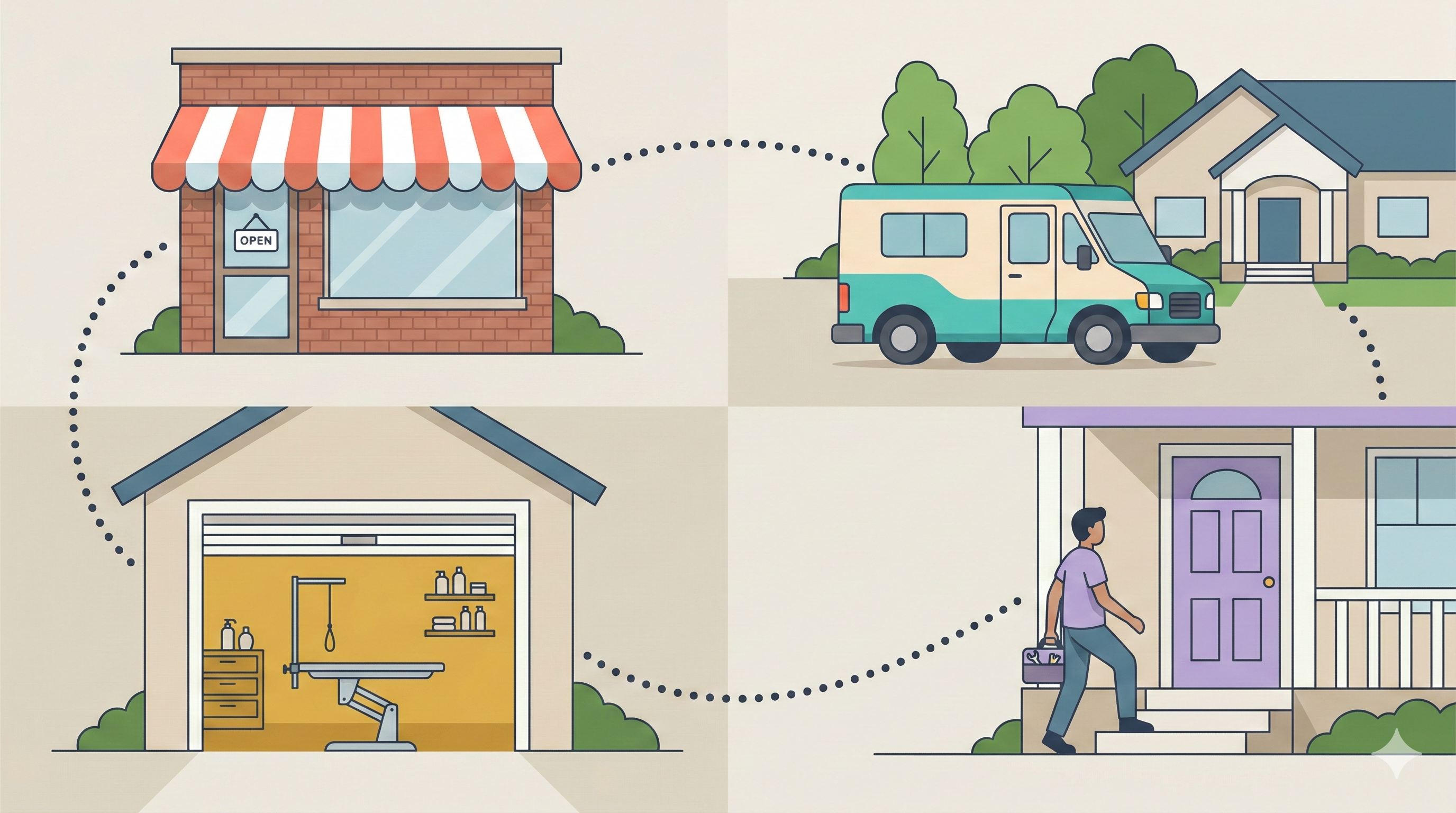
Pet Grooming Scheduling Software for Every Business Type
“Grooming business” covers several operational models, each with distinct needs.
Grooming Salons and Multi-Groomer Shops
Salons juggle multiple groomers, multiple tables, front desk check-in, and retail sales. The software handles scheduling capacity across all resources—preventing the bottleneck where three dogs need the tub simultaneously.
Mobile Dog Groomers
Mobile operations require on-the-go access from phones or tablets, client address storage, and systems that work without reliable wifi. The booking page captures appointments while you’re mid-groom in someone’s driveway.
Daycare, Boarding, and Retail Operations
Some platforms handle daycare bookings, boarding reservations, and retail-only transactions alongside grooming. If you offer multiple services, managing everything in one system eliminates the chaos of switching between apps.
Pet Grooming Software Pricing and Free Trial Options
Pricing models vary: per-location, per-groomer, or flat monthly fees. Understanding how costs scale matters as your business grows.
| Pricing Model | Pros | Cons |
|---|---|---|
| Per-groomer | Scales with actual usage | Costs increase as you hire |
| Flat fee | Predictable costs | May overpay if you’re small |
| Per-location | Good for multi-shop owners | Expensive for single locations |
When evaluating options, check whether essential features—like automated reminders or online booking—are included or locked behind higher tiers. A $29/month plan that charges extra for SMS reminders may cost more than a $49/month plan with everything included.
Free trials let you test with real clients and real workflows before committing. Look for trials long enough to see actual results—at least 14 days, ideally 30-60.
Stop Losing Money to Empty Appointment Slots
The math is clear. A groomer losing 4 appointments weekly to no-shows, schedule chaos, and missed booking opportunities loses $15,000+ annually. Software that cuts those losses in half pays for itself after one saved appointment per month.
The solution isn’t working harder or being more organized. It’s implementing systems that automate reminders, centralize records, and protect your calendar with business rules—so you can focus on grooming instead of chasing clients and doing schedule math.
FAQs About Grooming Booking Systems
How do I migrate client data from my current system to new pet grooming software?
Most platforms offer data import tools that accept spreadsheets (CSV or Excel files) containing client names, contact info, pet details, and appointment history. Some providers offer migration support where their team handles the import for you. Before signing up, confirm the platform can import your specific file format and ask about any data limits.
Do clients need to download an app to book grooming appointments online?
No. Most grooming booking systems use a web-based booking page that clients access through a link—no app download required. You share the link on your website, social media, or in text messages, and clients book directly in their browser.
Can I customize the wording of automated reminder messages?
Yes. Most pet grooming software lets you edit reminder templates so the tone matches your brand. You can typically customize the message text, timing, and which services trigger specific reminders. Some platforms also let you add your business name, appointment details, and reschedule links automatically.
Is there a contract or can I cancel my grooming software subscription anytime?
Most grooming software operates on month-to-month billing with no long-term contract. You can typically cancel anytime without penalty. Some platforms offer discounts for annual commitments—check the specific terms before choosing a billing cycle.
How does grooming booking software handle walk-in appointments?
Staff add walk-in appointments directly to the calendar in real time, just like scheduled bookings. The system updates availability instantly, so the online booking page reflects that the slot is now taken. This prevents double-booking between walk-ins and online reservations.
Can grooming software send reminders via email instead of text message?
Many platforms support both SMS and email reminders, and some let you use both simultaneously for maximum reach. Check whether SMS messages are included in the base price or charged per message—costs can add up quickly at high volumes.