· Knowledge Base · 9 min read
Automated Appointment Reminders to Boost Show-Up Rates
How automated appointment reminders reduce no-shows. Covers setup, reminder cadence, and the features that keep your calendar full.
What are automated appointment reminders
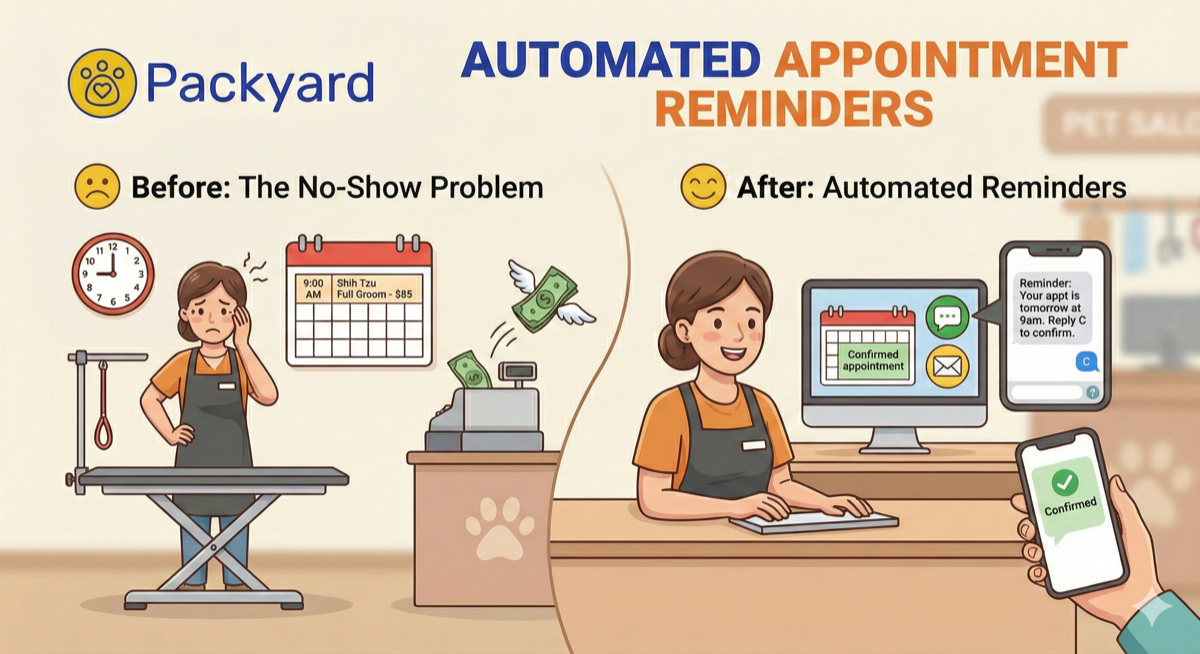
It’s 9:15am Wednesday. Your 9am Shih Tzu full groom—$85 on the books—never showed. You’ve already pulled the file, prepped the table, and turned away a last-minute request for that slot yesterday. That’s not just $85 gone. It’s the client you said no to, plus 20 minutes of prep you can’t bill.
Automated appointment reminders are software tools that send scheduled text messages, emails, or voice calls to clients before their appointments without any manual effort from you or your staff. The software connects to your calendar, triggers messages at times you set (like 24 hours before and again 2 hours before), and lets clients confirm, cancel, or reschedule by replying directly. When a client responds, the system updates your calendar automatically.
The core function stays the same whether you’re running a grooming salon, a veterinary clinic, or a massage practice: keep appointments top of mind and give clients an easy way to communicate changes before the slot goes empty.
How automated appointment reminder software works
Once you configure your settings, the workflow runs on autopilot. You set your preferences once, and the system handles every appointment that hits your calendar from that point forward.
1. An appointment gets booked
A client books online or your staff enters the appointment manually. The system captures the client’s phone number and email at that moment, and the reminder sequence triggers automatically. No extra steps, no separate data entry.
2. The system sends reminders on a set cadence
Cadence refers to the timing pattern for your messages. A typical sequence might include a confirmation right after booking, a reminder 48 hours out, another at 24 hours, and a final nudge 2 hours before.
Each touchpoint catches different scenarios: the client who forgot entirely, the one who realized they have a conflict, the one who just wants reassurance they’re on the schedule.
3. Clients confirm or reply via text
Two-way messaging lets clients respond directly to your reminder. They can text back “C” to confirm, ask to reschedule, or let you know they’re running late. Their reply syncs to your calendar without anyone copying information over manually.
4. Confirmation status updates automatically
Your calendar shows who confirmed, who hasn’t responded, and who canceled—all at a glance. No chasing clients across personal phones or sticky notes. Staff can see the status from any device and act accordingly, whether that means calling an unconfirmed client or opening the slot to your waitlist.
How much do text appointment reminders reduce no-shows
The math is straightforward. Say your average groom runs $75, and you’re seeing 3 no-shows per week without a reminder system. That’s $225 weekly, or $11,700 annually—gone.
| Scenario | No-Shows/Week | Lost Revenue/Month |
|---|---|---|
| No reminders | 3 | $900 |
| With automated SMS | 1 | $300 |
That’s $600/month recovered, or $7,200/year. The cost of most reminder software runs $30-50/month, so the return shows up quickly.
The real cost of skipping an appointment reminder system
Lost ticket revenue is only the visible damage. The hidden costs add up faster than most groomers realize.
- Wasted prep time: You bathed the dog in your head, pulled the file, set up the table. That’s 15-20 minutes of work for a client who never walked in.
- Unfilled slots: That empty hour could have gone to someone on your waitlist—if you’d known in time to offer it.
- Staff idle time: Groomers standing around with nothing to do still cost you wages.
- Rebooking effort: Calling, texting, documenting, rescheduling. Even a “resolved” no-show—one you eventually get back on the books—eats 15 minutes of admin work.
Every no-show isn’t just lost revenue. It’s lost time you can’t bill for, multiplied across your week.
Features that make appointment reminder software work
Not all reminder tools deliver the same results. Here’s what separates effective software from basic alerts.
Customizable SMS reminder templates
Generic messages get ignored. Effective reminders include the client’s name, pet’s name, service booked, date, time, and clear reply instructions.
Example: “Hi Sarah, this is a reminder that Max has a full groom at Paws & Claws on Friday at 10am. Reply C to confirm.”
That level of personalization takes a message from “probably spam” to “oh right, I have an appointment.”
Automated confirmation tracking
The software shows who confirmed, who’s still pending, and who canceled—without you checking multiple places. You can flag uncertain appointments and prepare backup plans before the slot goes empty.
Two-way text messaging
Clients can reply directly to confirm, cancel, or ask questions. Conversations stay in one shared inbox tied to appointments, not scattered across staff phones. Everyone on your team sees the same information.
Flexible reminder timing cadence
Different services benefit from different lead times. A quick nail trim might only warrant a same-day reminder, while a 3-hour full groom benefits from 48-hour notice. Your software allows you to adjust timing per service type.
Calendar and online booking integration
Reminders trigger automatically from your booking system—no manual setup for each appointment. Look for sync with your existing calendar, online booking page, or scheduling software.
Payment processor sync
For businesses using Square, checkout stays connected to your reminder system. Packyard’s native Square integration keeps services, retail, tips, and taxes in sync so you’re not reconciling two systems at end of day.
SMS vs email appointment reminders
Both channels have their place, but they serve different purposes.
| Factor | SMS Text Reminders | Email Reminders |
|---|---|---|
| Open rate | 90%+ (most texts read within 3 minutes) | 20-30% (emails often sit unread) |
| Response rate | Higher—easy to reply with one letter | Lower—requires opening and clicking |
| Best for | Time-sensitive confirmations (24hr, 2hr) | Detailed prep instructions, policies |
| Cost | May have per-message fees | Usually included |
The practical approach: use SMS for confirmations and day-of reminders, email for detailed information like grooming prep instructions or policy updates. Most effective systems use both channels together.
How to set up automated text reminders for appointments
Most appointment reminder software can be configured in under an hour. Here’s the process.
1. Connect your scheduling calendar or booking system
Import existing appointments or integrate with your current calendar. Make sure client phone numbers are captured for every booking—reminders can’t send without them.
2. Set your reminder timing
A proven cadence: confirmation immediately after booking, reminder at 24 hours, final reminder at 2 hours before. Longer appointments often benefit from a 48-hour touchpoint as well.
3. Customize your reminder message templates
Include your business name, client name, pet name, date, time, service, and reply instructions. Keep messages under 160 characters for single SMS delivery. Personalization matters—“Max’s grooming appointment” gets more attention than “your upcoming appointment.”
4. Enable two-way client replies
Turn on reply handling so clients can confirm with a simple text back. Set up staff notifications so replies don’t sit unread. The goal is immediate visibility into who’s confirmed.
5. Test your reminder sequence before launch
Send a test reminder to yourself. Verify timing, message content, and reply functionality work as expected.
Pre-launch checklist:
- Reminder timing matches your workflow
- Message includes all key details (name, pet, service, date, time)
- Reply confirmation works and updates calendar
- Staff knows where to check confirmation status
How to choose the best appointment reminder service
Not every tool fits every business. Here’s what to evaluate.
Delivery reliability
Messages have to actually arrive. Ask about SMS delivery rates and whether the provider uses direct carrier connections. Email-to-SMS gateways are less reliable than direct connections.
Message personalization
Can you include client name, pet name, service details, and custom fields? Generic messages feel impersonal and get lower response rates.
Integration with your current tools
Does the software connect to your calendar, booking system, and payment processor without manual data entry? Disconnected tools create extra work and increase the chance of errors.
No-show tracking and client flagging
Track patterns over time. Identify repeat no-show offenders so you can require deposits or card-on-file for unreliable clients before they ghost you again.
Industry-specific workflows
Generic appointment tools don’t understand grooming workflows. Pet businesses benefit from pet profiles, behavior notes, service stacking, and multi-groomer views—not just a calendar slot.
Why grooming businesses need appointment reminder software built for pet services
Grooming isn’t a generic appointment. A “full groom” might include bath, haircut, nail trim, ear cleaning, and cleanup time—stacked services that generic calendars can’t represent properly.
Pet-specific details matter too. Behavior flags, coat notes, medical alerts, and vaccination records travel with the reminder and stay visible to whoever’s working that day. When your reminder says “Bella’s grooming appointment,” it connects better than “your upcoming appointment.”
Multi-groomer, multi-table operations require visibility into capacity that generic tools don’t provide. You’re not just booking time slots—you’re managing tables, staff, and service flow simultaneously.
Packyard was built by groomers specifically to handle grooming workflows in a market valued at $2.06 billion: automated reminders, confirmation tracking, pet profiles, and Square-native payments in one system. The goal is to stop doing time math in your head and see every groomer, every table, and every pet at a glance.
Fill your calendar with automated reminders that work
Automated appointment reminders reduce no-shows, eliminate manual reminder calls, and protect revenue you’d otherwise lose to empty slots. If one saved appointment per month covers the cost of your software, everything after that is recovered profit.
Start your free trial today and stop losing money to clients who forget to show up.
FAQs about automated appointment reminder software
What is the best appointment reminder software?
The best appointment reminder software depends on your industry. Square Appointments works for general businesses, while specialized tools like Packyard are built specifically for pet grooming, daycare, and boarding operations where pet profiles and service stacking matter.
How many text reminders should I send before an appointment?
Most businesses see the best results with two to three reminders: one shortly after booking to confirm, one 24 hours before, and one 2 hours before the appointment.
Can automated appointment reminders include my client’s pet name?
Yes, if your reminder software supports custom fields. Packyard pulls pet names directly from client profiles so every reminder feels personal and gets higher response rates.
What should I do if a client does not confirm their appointment?
Follow up with a manual call or text, and keep a waitlist ready to fill the slot if they don’t respond. Some software flags unconfirmed appointments automatically so you can act before the slot goes empty.
How do I track clients who repeatedly no-show?
Use appointment reminder software with no-show flagging that tracks patterns over time. Flagging lets you require deposits or card-on-file for unreliable clients before they cost you another empty slot.
Does appointment reminder software work for mobile pet groomers?
Yes. Cloud-based reminder tools work anywhere you have phone or tablet access—no desktop setup required. Look for software designed for mobile operations that syncs across devices.